





Experience Seamless Computing with Windows 11 Home
Step into a new era of computing with Windows 11 Home, designed to offer a sleek, efficient, and user-friendly experience. Whether you’re working, gaming, or simply browsing, Windows 11 Home provides the tools to enhance your productivity and creativity. Built with everyday users in mind, this version makes it easier to stay focused and connected.
Why Choose Windows 11 Home?
A Fresh, Intuitive User Interface
Windows 11 Home is built to simplify your digital workspace. The new interface is centered around ease of use, allowing you to navigate tasks with minimal effort. The redesigned Start menu, taskbar, and layout are all about streamlining your experience so you can get things done with less distraction.
Boost Your Productivity
- Snap Layouts & Virtual Desktops: With Snap Layouts, you can organize your open windows to fit perfectly on your screen. It helps you multitask and stay productive by creating custom desktops for each of your work projects.
- Microsoft Teams Integration: Stay in touch with family, friends, or colleagues through the built-in Microsoft Teams, making collaboration and video calls easier than ever. Access this right from your taskbar and never miss an important update with the customizable Widgets feature.
Security You Can Trust
Windows 11 Home prioritizes your data security, giving you built-in protections like biometric login, TPM 2.0 encryption, and advanced malware protection. It also offers Zero Trust security, combining multiple layers of protection to help safeguard your personal information and keep unauthorized users at bay.
A Better Gaming Experience
If you’re a gamer, Windows 11 Home brings DirectX 12 Ultimate support, which maximizes your graphics performance for ultra-realistic gaming. Experience faster load times, enhanced graphics, and smoother gameplay.
What’s New in Windows 11 Home?
- Improved Layouts: Snap multiple windows at once with Snap Layouts and easily switch between them to stay focused on the task at hand.
- AI-Powered Copilot: The new Copilot assistant can help with everything from summarizing web pages to suggesting writing ideas and generating code—right from your desktop.
- Microsoft Power Automate: Automate your workflows and increase efficiency with the new built-in automation tools that work seamlessly across Windows and Microsoft apps.
More about co-pilot, AI Powered Assistant
Buy Windows 11 Home Product Key – Best Price in India
Looking for the best deal on Windows 11 Home? Flash Fix India offers competitive pricing for the Windows 11 Home product key so you can enjoy all the benefits of the latest operating system. When you buy Windows 11 Home activation key from us, you get:
- Instant Digital Delivery: Receive your Windows 11 Home license and instructions immediately after purchase.
- Lifetime License: One-time payment for lifetime access to Windows 11 Home, with free updates and security patches.
- Easy Activation: Activate your Windows 11 key quickly and securely, with straightforward instructions.
Before purchasing, ensure your device meets the minimum system requirements. Please follow the link for more information,
Activating Windows 11
- Download Windows 11 from the official Microsoft website.
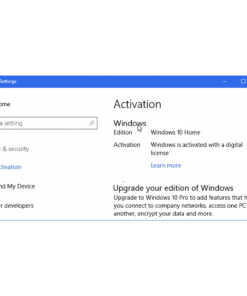
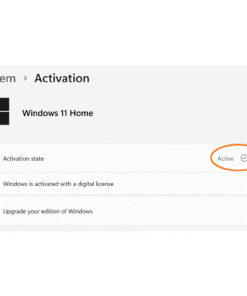
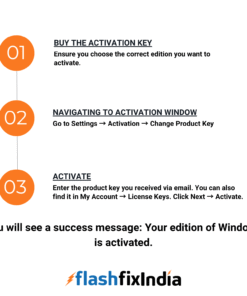
- Activate: Go to Settings → Update & Security → Activation and select Activate or Change Product Key.
- Enter the Windows 11 Product Key received in your email, you can also find in My account → License Keys. and follow the on-screen instructions.
For Detailed installation and Activation of Windows 11. Please refer Windows 11 Activation & Installation.
Any issues with Activation please raise a ticket or reach us through WhatsApp.
Why Choose Flash Fix India for Windows 11 Home?
At Flash Fix India, we make sure you get genuine Windows 11 Home keys at the most affordable prices in the market. Our quick digital delivery and one-time activation process make it easy to upgrade your system with the latest OS. With a lifetime license, your Windows 11 Home will continue to perform at its best for years to come.